

When you parse a file, the parsing results include descriptions of images called captions. Captions appear in theDocumentation Index
Fetch the complete documentation index at: https://docs.landing.ai/llms.txt
Use this file to discover all available pages before exploring further.
markdown field of figure-type chunks. For more information, see Image-Based Chunks.
Use the optional custom_prompts parameter to tell how to describe figures during parsing.
When to Add Custom Prompts
Adding custom prompts can be helpful if:- The default image descriptions do not fit your use case.
- The downstream processing tasks require the image descriptions to use a specific format or language.
- The images or charts are unique to your organization or use case and you need to provide additional context about what they represent.
Sample Prompts
Make the description more concise This is helpful if you want to minimize the number of input tokens when running the Split or Extract APIs, or if the images are straightforward and do not need much description.Supported Models
Thecustom_prompts parameter is only supported with .
does not generate figure captions, so the parameter does not apply when using that model. Passing it with will return a 422 error. For more information about parsing models, see Document Pre-Trained Transformers (Parsing Models).
Requirements
Thecustom_prompts parameter accepts a JSON string. Only the figure key is supported. Any other key will be rejected.
The custom prompt can include up to 512 characters.
Use Custom Prompts in the Playground
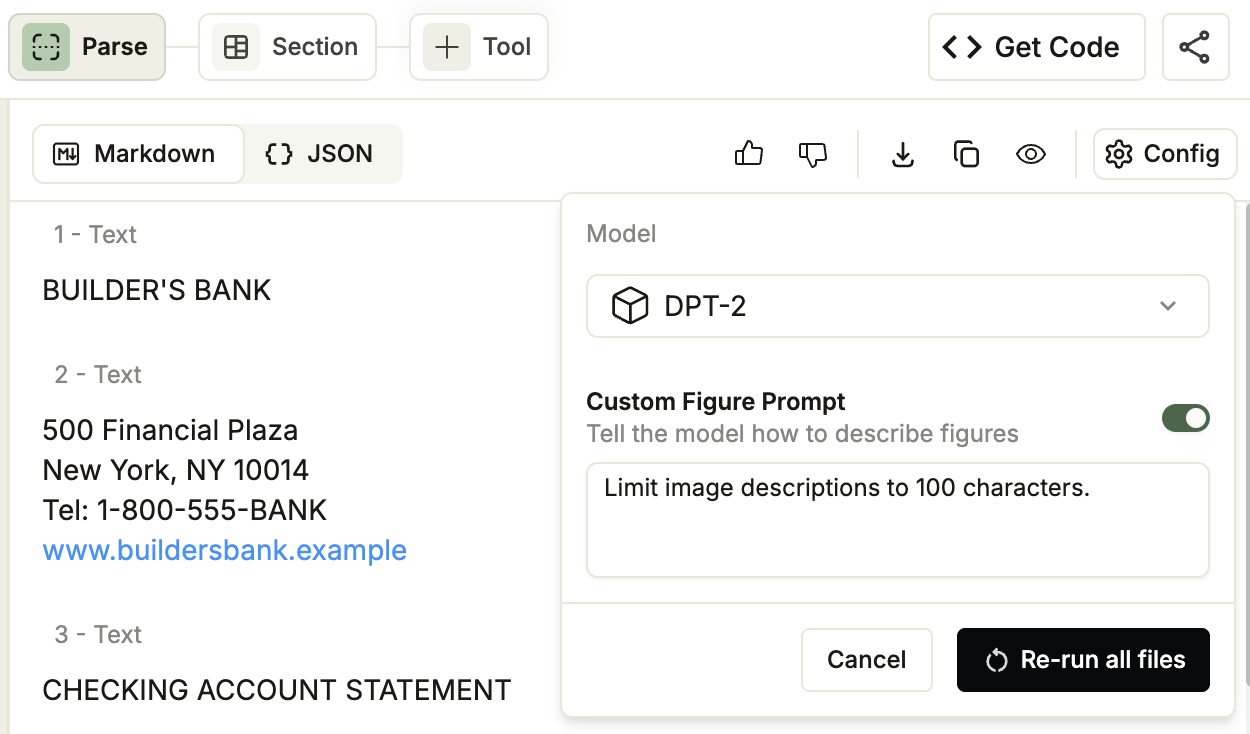
Apply a custom figure prompt to every file in a project directly from the Playground without writing any code.- Open a project in the Playground.
- Click the Parse tab.
- In the top-right corner of the parse result panel, click Config.
- From the Model drop-down, select . The Custom Figure Prompt option is only available with .
- Turn on the Custom Figure Prompt toggle and enter your prompt (up to 512 characters).
- Click Re-run all files. The Playground re-parses every file in the project using your prompt.
Use Custom Prompts with the API
Use Custom Prompts with Our Libraries
When using the library, passcustom_prompts as a JSON string using json.dumps. The Parse endpoints use multipart form data, so the parameter does not accept a dictionary directly.
You can also pass a string literal (for example, '{"figure": "YOUR_CUSTOM_PROMPT"}'), but json.dumps is preferred because it handles escaping and formatting automatically, reducing the risk of malformed JSON that causes a 422 error.